
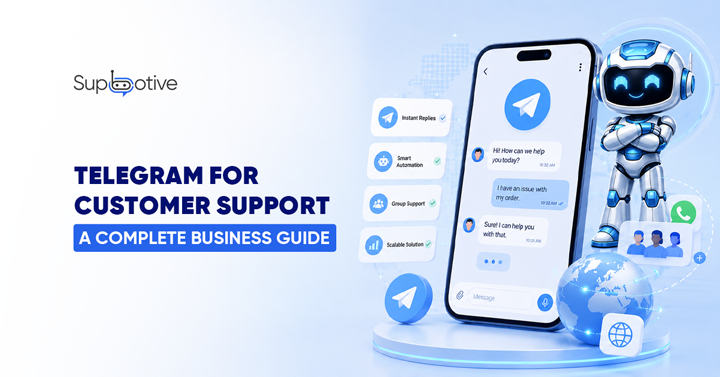
Telegram for customer support means using Telegram’s free, unlimited Bot API to automate customer conversations, answer questions, escalate complex cases, and manage community style support at scale. It works best for businesses with international audiences, tech savvy customers, or community-driven products like gaming, crypto, and software. For UK only consumer businesses, WhatsApp is usually the primary channel Telegram is the strong secondary.
What Is Telegram for Customer Support?
Telegram for customer support is the use of Telegram’s messaging platform specifically its Bot API to handle customer queries automatically or semi automatically, instead of relying only on human agents responding manually.
Unlike WhatsApp, where bots run through a Business API with per conversation fees and strict messaging windows, Telegram offers a completely free, unlimited Bot API. Unlike chatbots on other platforms, Telegram bots are lightweight server-side applications that communicate via Telegram’s Bot API. They don’t need a phone number, can be added to groups and channels, and support rich interactions including inline keyboards, media, files, polls, payments, and HTML rendering.
In practical terms: a customer messages your Telegram bot, the bot reads their intent, searches your knowledge base, and replies instantly. If the query is too complex, it escalates to a human agent with the same automation first. Human, when necessary, model used on WhatsApp.
The difference is the platform underneath. Telegram’s openness gives bots capabilities WhatsApp does not allow larger file sharing, bigger groups, no messaging window restrictions, and zero platform fees.
Who Should Use Telegram for Customer Support?
This is the honest part most guides skip. Telegram is not the right primary channel for every business.
Telegram is the right primary channel if:
- Your audience includes crypto, Web3, fintech, or developer communities. Telegram is the dominant platform worldwide for these audiences. For businesses targeting these regions or tech savvy audiences, Telegram is not optional. It is a primary customer engagement channel .
- You run gaming communities, NFT projects, or other group based products Telegram supports groups up to 200,000 members, far beyond WhatsApp’s 1,024-member limit .
- Your customers are concentrated in Eastern Europe, Russia, Iran, or parts of Asia regions where Telegram adoption rivals or exceeds WhatsApp.
- You need to send large files. Telegram allows 2GB per file compared to WhatsApp’s 100MB limit.
- You want zero platform fees Telegram’s Bot API is completely free and unlimited, with no per conversation charges.
Telegram is a strong secondary channel if:
- You are a UK or Western European business where WhatsApp is the dominant consumer channel, but you have an international or tech savvy customer segment
- You run a SaaS, software, or digital product business where some customers prefer Telegram’s developer friendly ecosystem
- You want a community plus support channel Telegram lets you combine group broadcasts, channels, and 1:1 bot support in one platform
- Your customer base is entirely UK consumer facing retail or local services, with no international or tech savvy segment WhatsApp alone likely covers your needs
- You have limited resources and need to prioritize one channel start with WhatsApp first if your audience is UK based
Telegram is probably not necessary if:
The Telegram Bot API Explained in Plain English
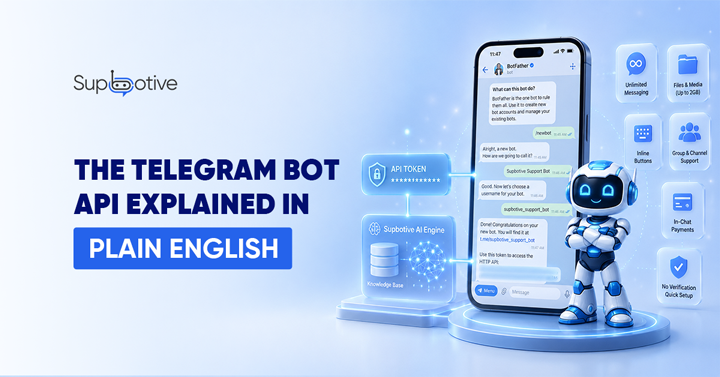
Here is the part that confuses most business owners, simplified.
A Telegram bot is not a phone number-based account like a WhatsApp Business number. It is a small piece of software registered through Telegram’s own bot creation tool, called BotFather. You message BotFather inside Telegram, give your bot a name, and Telegram generates a unique API token a string of characters that authorises your bot to send and receive messages.
You can create Telegram bots with the BotFather or build your own through an API. That token connects your bot to whatever system runs the actual logic in Supbotive’s case, the knowledge base and AI engine that reads customer messages and generates responses.
There is no business verification process like WhatsApp requires. No phone number registration. No waiting period. A bot can be created and connected within minutes.
What the Bot API allows:
- Sending and receiving unlimited text messages completely free
- Sharing images, documents, and files up to 2GB
- Building interactive menus using inline keyboards
- Running polls, quizzes, and structured forms
- Operating inside both 1:1 chats and group channels
- Processing payments directly within the chat
Telegram provides a complete Bot API at no cost and with no volume limits a meaningful difference from WhatsApp’s per conversation pricing model.
How AI Automation Works on Telegram
The underlying mechanism is the same as WhatsApp automation because the AI logic does not care which messaging platform delivers it.
1. The customer sends a message to your Telegram bot in a direct chat or within a group.
2. NLP reads the intent. The bot uses natural language processing to understand what the customer means, not just the words they typed. “How do I get a refund?” and “Can I send this back?” both map to the same return policy intent.
3. The knowledge base is searched. Using RAG (Retrieval Augmented Generation), the bot retrieves the most relevant answer from your actual documentation of FAQs, policies, product guides rather than generating a response from scratch.
4. The bot replies instantly if a confident match is found. The response appears directly in the Telegram chat.
5. Smart escalation fires if the query is too complex, the customer seems frustrated, or the question needs live data the bot cannot access. The conversation with full history passes to a human agent.
6. The loop closes. Unanswered questions get flagged, a human resolves them, and the answer is added to the knowledge base. Next time, the bot handles it automatically.
This is the exact same automation first, human, when necessary, model that powers WhatsApp support applied to a different platform with different technical capabilities underneath it.
Telegram vs WhatsApp for Business Support the Real Comparison
| Feature | Telegram | WhatsApp Business |
| Bot API cost | Free, unlimited | Per conversation fees apply |
| Messaging window | None message anytime | 24-hour customer service window |
| File sharing limit | 2GB per file | 100MB per file |
| Group size | Up to 200,000 members | Up to 1,024 members |
| Channel broadcasts | Unlimited subscribers | Limited broadcast lists |
| Setup time | Minutes via Bot Father | Hours to days Meta verification |
| Business verification | Not required | Required documents, phone, approval |
| UK consumer adoption | Lower niche audiences | Very high primary channel |
| Best regional fit | Eastern Europe, Russia, crypto/tech globally | UK, Western Europe, most of Asia |
| Best for | Communities, international, tech savvy | Mainstream consumer support |
This comparison comes from current platform documentation and aggregated business usage data . Unlike WhatsApp and Messenger, which restrict bot capabilities and charge per conversation, Telegram offers an open, free, and feature rich bot ecosystem.
The practical takeaway for most UK businesses: WhatsApp first, Telegram second unless your specific audience (crypto, gaming, international, developer focused) points the other way.
Setting Up Telegram for Customer Support the High-Level Steps
Full setup walkthrough is covered in a dedicated guide, but here is the overview:
- Open Telegram and message Bot Father Telegram’s official bot creation tool
- Create your bot give it a name and username; BotFather generates your unique API token
- Connect the token to your support platform paste it into Supbotive’s Telegram integration settings
- Train your knowledge base upload your FAQs, policies, and product documentation
- Set escalation triggers decide which queries always go to a human agent
- Test the bot send messages covering both answerable and escalation triggering queries
- Go live share your bot’s username with customers or embed it in your website and social channels
Unlike WhatsApp, there is no business verification waiting. A Telegram bot can go from creation to live testing within the same session.
Common Use Cases for Telegram Customer Support
Alt Text: Common use cases for Telegram customer support, ecommerce, SaaS tier-1 support, crypto communities and appointment scheduling
E commerce order and policy support E commerce bots on Telegram see 35% fewer “Where’s my order?” support tickets after deploying policy-based automation. For UK ecommerce brands with international customers, this is a meaningful volume reduction.
SaaS and software tier 1 support: A B2B SaaS startup built a Telegram bot that handles tier 1 support password resets, billing questions, feature requests. Their 5-person support team went from answering 200+ tickets daily to handling only escalated complex cases. Monthly support hours dropped from 350 to 40.
Crypto, Web3, and gaming communities: Telegram remains the dominant platform globally for these audiences combining community channels, group moderation, and 1:1 support bot in a single ecosystem business in other sectors that do not have access to.
Appointment scheduling for service businesses: Service businesses, salons, clinics, consultants use Telegram bots for appointment scheduling. The bot shows available slots via inline keyboards and collects client details automatically.
International customer support at scale: For businesses serving customers across multiple countries and languages, Telegram’s lack of messaging window restrictions and zero per conversation cost make it economical to scale support without the cost structure WhatsApp imposes at volume.
How Supbotive Works on Telegram
For businesses with international, tech savvy, or community driven audiences, Supbotive extends the same automation model used on WhatsApp to Telegram.
Connect your Telegram bot token to Supbotive, train it on your existing documentation FAQs, return policies, product guides and it starts answering customer queries immediately. Routine questions are resolved from your knowledge base automatically. Complex queries escalate to your team with the full conversation history attached, so nothing gets lost between bot and agent.
Every unanswered question is flagged automatically, your team reviews it once, adds the correct answer, and the bot handles the same query automatically from then on. The same self-learning loop that improves WhatsApp support applies equally to Telegram.
For businesses running both channels, Supbotive manages WhatsApp and Telegram conversations from a single knowledge base, so your team is not maintaining two separate sets of FAQs and policies.
Want to bring AI powered customer support to your Telegram bot alongside WhatsApp, from one knowledge base? Book a live demo with Supbotive and see how it works with your real FAQs and policies.
FAQs
What is Telegram used for customer support?
Telegram is used to automate and manage customer conversations through its free Bot API answering FAQs, handling order and policy questions, scheduling appointments, and escalating complex queries to human agents. It is particularly strong for businesses with international, tech savvy, or community driven audiences such as crypto, gaming, and software companies.
Is Telegram better than WhatsApp for customer support?
It depends on your audience. WhatsApp dominates consumer support in the UK and Western Europe. Telegram is stronger for international audiences, crypto and tech communities, and businesses needing larger group sizes, bigger file sharing limits, or zero per conversation fees. Most UK businesses use WhatsApp as the primary channel and Telegram as a secondary one for specific audience segments.
Do I need a developer to set up a Telegram bot for customer support?
No. Telegram’s Bot Father creates a bot and generates an API token within minutes, with no coding required for the creation step. Connecting that token to an AI platform like Supbotive which handles the knowledge base, NLP, and escalation logic also requires no development team.
Is the Telegram Bot API free?
Yes. Telegram provides a complete Bot API at no cost and with no volume limits unlimited text messages, file sharing up to 2GB, and no per conversation charges. This differs significantly from WhatsApp Business API, which charges for certain message types and conversation volumes.
What businesses benefit most from Telegram customer support?
Businesses with crypto, Web3, gaming, or developer focused audiences benefit most, as Telegram is the dominant platform for these communities globally. E-commerce and SaaS businesses with international customer bases also benefit from Telegram’s lack of messaging window restrictions and lower operating costs at scale.