
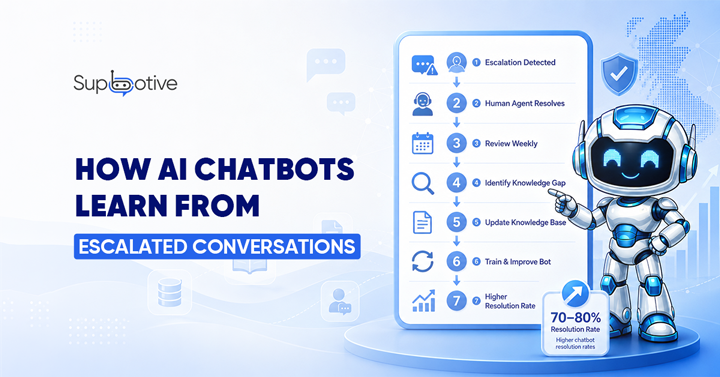
Your Chatbot Gets Smarter Every Time It Fails
Most businesses treat escalation as a failure. It is not.
When a chatbot cannot answer a question and passes it to a human agent, that conversation tells you three things simultaneously what the customer needed, what the chatbot did not know, and what needs to be added to the knowledge base.
That is not a failure. That is the most useful feedback signal your chatbot can generate.
The businesses with the most accurate customer support chatbots are not the ones that launched with the best AI model. They are the ones that built a consistent process for turning escalated conversations into improved responses. The loop compounds over time and so does the accuracy.
How the Learning Loop Actually Works
Here is what happens behind the scenes when a well-managed chatbot escalation occurs:
Step 1: The chatbot hits a gap. A customer asks something the chatbot cannot answer confidently. Instead of guessing, it recognizes it is out of its depth and escalates passing the full conversation history to a human agent.
Step 2: The human agent resolves it the agent reads the conversation from the start, understands the context, and gives the customer a clear, accurate answer. This is the correct response the one the chatbot should have given.
Step 3: The gap is reviewed and documented The escalated conversation is flagged for review. Someone on the team looks at what was asked, why the chatbot could not answer it, and what the correct response is.
Step 4: The knowledge base is updated The correct answer is added to the knowledge base in a clear Q&A format. The next time a customer asks the same question or something similar the chatbot handles it automatically.
Step 5: Resolution rate climbs Each cycle raises the chatbot’s ability to resolve queries without human involvement. Teams that run this loop weekly consistently achieve 70 80% resolution rates within a few months of deployment.
This is reinforcement learning from human feedback (RLHF) in its most practical, accessible form no data science team required.
Why Most Businesses Do Not Use This Data

The escalated conversations pile up. The same gaps appear again and again. The chatbot’s resolution rate plateaus. Teams assume the AI is just limited when the actual problem is that nobody is closing the feedback loop.
Cases where the chatbot gave an incorrect or low confidence response are flagged for analysis. Those examples are added to the training data with correct answers. The model is updated with improved accuracy. In production deployments, this cycle happens weekly or monthly in well run teams.
The difference between a chatbot that handles 40% of queries and one that handles 75% is almost never the AI model. It is almost always the quality and consistency of the knowledge base maintenance process behind it.
What to Look for in Escalated Conversations
Not all escalations are equal. Some tell you more than others.
High value escalations to review first:
- Questions that appear repeatedly in escalation logs these are gaps that cost you the most volume
- Questions where the chatbot gave a confident but wrong answer these damage trust more than a clean escalation
- Questions that fall just outside existing knowledge base entries a small tweak to an existing answer often covers them
- Questions containing new product names, policy changes, or seasonal topics these usually mean your documentation has not caught up
Escalations you can deprioritize:
- One off highly specific query unlikely to recur
- Emotional or sensitive conversations that should always go to a human
- Complex multi part queries that genuinely need agent judgment
Reviewing escalations does not need to be a major time commitment. Thirty minutes a week spent on the highest volume gaps will move your resolution rate more than any other single action.
The Sentiment Signal When Escalation Is About Emotion, Not Knowledge
Not every escalation happens because the chatbot does not know the answer. Some happen because the customer is frustrated.
Modern AI chatbots use sentiment analysis to detect emotional tone reading word choices, phrasing, and urgency signals in real time. When frustration is detected, the chatbot escalates regardless of whether it could technically answer the query. This protects the customer experience.
This sentiment triggered escalations are worth reviewing too not to add answers, but to understand which topics consistently generate customer frustration. That intelligence feeds back into how you write your knowledge base entries, how you structure your escalation triggers, and sometimes how you address the underlying product or service issue causing the frustration.
The Compounding Effect Over Time
Here is what the improvement curve looks like in practice.
A new chatbot deployment typically starts resolving 40 60% of inbound queries depending on how thorough the initial knowledge base setup was. Without any feedback loop, that number stays roughly flat.
With a consistent weekly review process escalations reviewed, answers added, knowledge base updated resolution rates climb to 70 80% within 60 90 days. Teams that maintain this discipline for six months or more often exceed 85%.
A common target is 70 80% of queries resolved within the chatbot’s scope, with the remaining queries escalated cleanly to human agents. That target is achievable for most businesses within the first quarter if the feedback loop is running.
How Supbotive Makes This Process Automatic
Most of the work described above happens manually in generic chatbot platforms. Supbotive is built to surface the gaps automatically.
Every conversation the customer support chatbot cannot answer gets flagged without anyone having to dig through logs. Your team sees the unanswered questions, adds the correct answer to the knowledge base, and the chatbot handles it next time.
For businesses managing customer conversations on WhatsApp and Telegram, this means the improvement loop runs in the background without needing a dedicated team to manage it.
The longer you use it, the less your team has to step in. That is the compounding effect working in your favour.
Want to see how Supbotive flags unanswered queries automatically and helps your team close knowledge gaps fast? Book a live demo and see the feedback loop in action.