
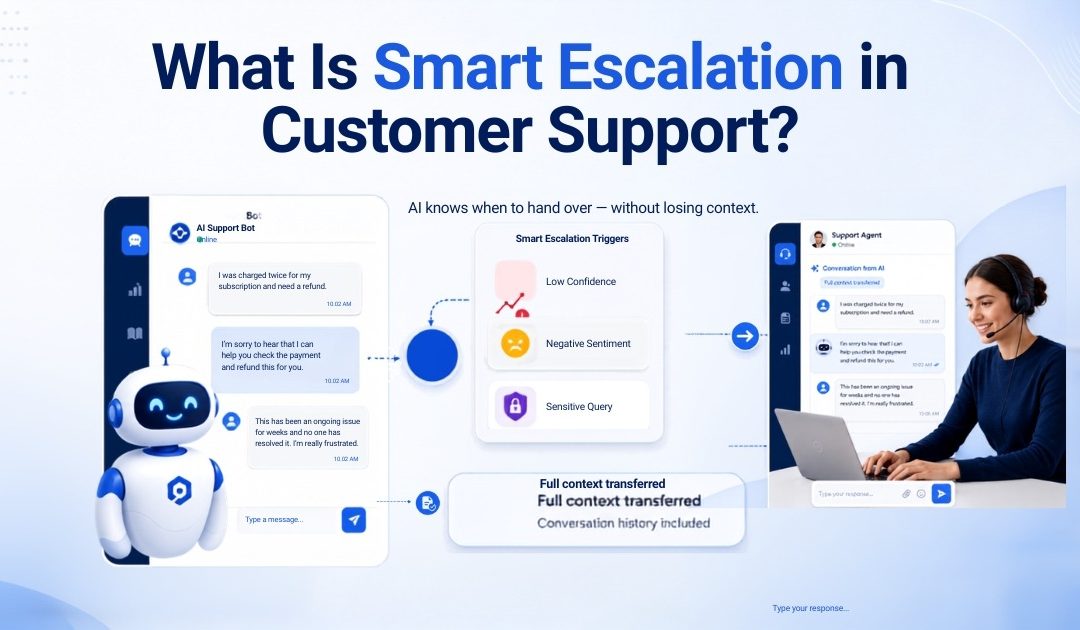
Smart escalation is the process an AI chatbot uses to decide automatically when a customer’s conversation should be transferred to a human agent. It uses confidence scores, sentiment analysis, and query-type rules to make that decision while transferring the complete conversation history.
Smart escalation in customer support allows an AI chatbot to stop responding when it cannot resolve a query safely or accurately. Instead of forcing the customer to request an agent, the system identifies the need for human support and transfers the conversation with its full context.
The objective is not to automate every interaction. It is to automate routine questions while ensuring complex, sensitive, or emotional conversations reach the right person at the right time.
Smart Escalation vs Basic Escalation: What Is the Difference?
Basic escalation is usually manual. A customer must type “speak to an agent,” select an option from a menu or repeatedly tell the chatbot that its answer was unhelpful.
Smart escalation is proactive. The system monitors the conversation and identifies when the chatbot should stop responding, even when the customer has not directly requested human assistance.
This difference matters because customers should not need to fight through an automated system before receiving appropriate support.
|
Basic escalation |
Smart escalation |
|
Customer manually requests an agent |
The system detects when human help is required |
|
Usually based on buttons or keywords |
Uses confidence, sentiment and query type |
|
May transfer only a short alert |
Transfers the complete conversation history |
|
Reactive and often delayed |
Proactive and context-aware |
A smart escalation chatbot therefore acts as a decision layer between automation and human support rather than simply providing an “agent” button.
The Three Triggers That Fire Smart Escalation
1. Low Confidence Score
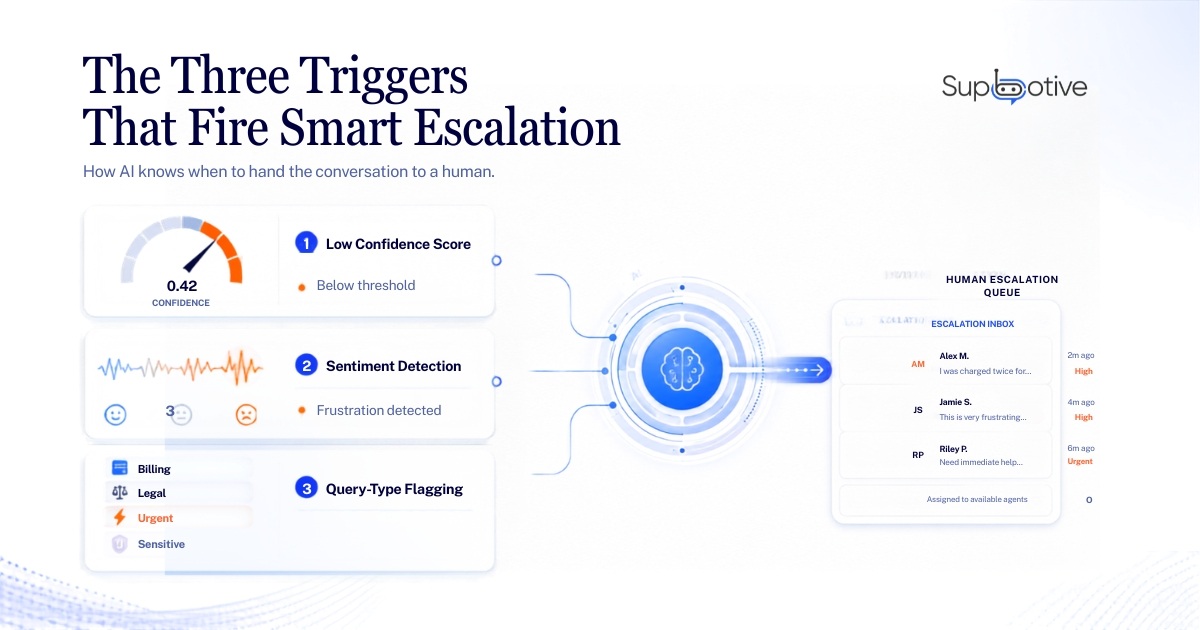
An AI chatbot assigns a confidence score to the answer it retrieves from the knowledge base. When the score falls below a defined threshold, the chatbot should avoid guessing and escalating the conversation.
The threshold can be adjusted depending on the business. Healthcare, finance, and other sensitive industries may use stricter confidence requirements than businesses handling general service questions.
2. Sentiment Detection
Sentiment analysis identifies signs that a customer is becoming frustrated, upset, or impatient. These signals may include negative language, urgency, capital letters, repeated questions, or several unsuccessful contacts.
A query may technically be answerable, but an emotional customer may still need empathy and human judgement. Sentiment analysis therefore runs in the background throughout the conversation rather than only after the chatbot fails.
3. Query-Type Flagging
Some conversations should always be escalated, regardless of the chatbot’s confidence score.
Businesses can configure automatic escalation rules for billing disputes, sensitive complaints, legal questions, urgent situations or requests requiring live account information. These rules should reflect the company’s actual support policies and risk levels.
What Happens During Smart Escalation?
A properly designed chatbot human handoff follows five steps:
- An escalation trigger fires. The system detects low confidence, negative sentiment, or a restricted query type.
- The human agent queue receives an alert. The conversation is sent to the appropriate support team, typically within seconds.
- The complete conversation history is transferred. The agent receives the customer’s messages, the chatbot’s answers, and the reason for escalation.
- The agent joins the same chat thread. The customer does not need to move to another platform or start a new conversation.
- The conversation continues without repetition. The agent can address the unresolved issue immediately because the relevant context is already available.
From the customer’s perspective, the transition should feel like one continuous support conversation.
Why Conversation History Transfer Matters Most
Many businesses successfully detect when escalation is needed but fail to transfer the context.
An agent may receive an alert saying that a customer needs assistance without seeing what the customer asked, which answers were already given or why the chatbot could not resolve the issue.
The customer is then forced to explain everything again.
According to Magnetic North, 71% of consumers would consider switching to a competitor if they had to repeat their query to multiple agents.
Complete context transfer prevents this. The agent can see the original question, review the chatbot’s responses, and understand what remains unresolved before replying.
That is what separates smart escalation from a basic conversation transfer.
What Should Always Be Escalated to a Human?
AI chatbots are useful for handling repetitive and information-based questions, but certain conversations require human judgement.
These include:
- Emotional complaints: Frustrated customers often need empathy and reassurance rather than another automated reply.
- Billing disputes: Payment of disagreements and refund exceptions require careful review.
- Live data requests: Account balances, real-time inventory, and live order tracking require access to current operational systems.
- Legal or compliance questions: The risk of an inaccurate answer is too high.
- Sensitive personal situations: Health, safety, and urgent circumstances should be reviewed by a trained person.
Supbotive does not connect directly to live order-tracking systems. When a customer requests live delivery information that is unavailable in the knowledge base, the conversation can be escalated to a human agent with its full history attached.
How Smart Escalation Improves Over Time
Every escalated conversation reveals something about the customer support process.
The support team can review why the escalation occurred, identify missing information and add an approved answer to the knowledge base. When a similar question appears again, the chatbot may be able to resolve it without human assistance.
This creates a continuous feedback loop:
Unanswered query → human resolution → knowledge-base update → improved future response
Businesses should review escalation data weekly rather than treating chatbot implementation as a set-and-forget project.
Over time, this process can improve answer accuracy, reduce unnecessary escalation and increase the automated resolution rate. Mature systems with strong knowledge-base maintenance may work toward resolving 70–80% of suitable routine conversations automatically.
How Supbotive Handles Smart Escalation
Smart escalation is built into Supbotive’s core customer support workflow rather than offered as a separate add-on.
The system can escalate conversations based on answer confidence, customer sentiment and business-defined query types. Each handoff includes the full conversation history, so the human agent knows what was asked, what the chatbot answered and why the conversation requires attention.
Escalated queries can also be flagged for knowledge-based reviews, helping businesses identify missing information and improve future responses. Supbotive supports this automation-first, human-in-the-loop approach across WhatsApp and Telegram.
FAQs
What is smart escalation in customer support?
Smart escalation is an automated process that detects when a chatbot should stop handling a conversation and transfer it to a human agent with full context.
What triggers smart escalation in an AI chatbot?
The main triggers are low answer confidence, negative customer sentiment, and predefined query types such as billing disputes or sensitive complaints.
What is the difference between smart and basic escalation?
Basic escalation requires the customer to request an agent. Smart escalation automatically detects when human assistance is needed and transfers the conversation proactively.
Does smart escalation work on WhatsApp?
Yes. A chatbot connected through the WhatsApp Business API can detect escalation triggers and transfer the conversation to a human agent within the same support workflow.