
TL;DR
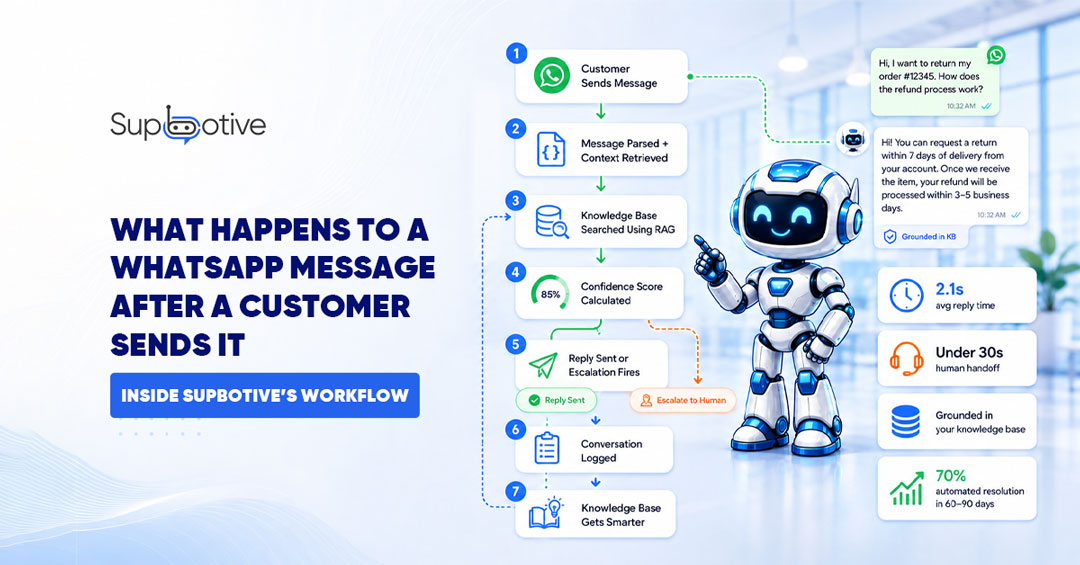
Seven things happen in under two seconds after a customer sends a WhatsApp message to a Supbotive powered business. The message arrives via the WhatsApp Business API, Supbotive reads the intent, undersatand the user query related to previous context, searches the knowledge base using RAG, and delivers an accurate reply in the same chat thread.
If it cannot answer confidently, smart escalation fires, and a human agent receives the full conversation history in under 30 seconds. The customer never repeats themselves.
Step 1: The Customer Presses Send
A customer types a question into WhatsApp and presses send. From their side, it looks like any other WhatsApp conversation a message bubble appears in the chat. Nothing feels different.
Behind the scenes, Meta’s infrastructure fires immediately. Every WhatsApp Business API connection run through a webhook with an HTTP callback that Meta sends to Supbotive’s server the instant a message arrives.
The message arrives as a JSON payload containing the customer’s phone number, their message text, a unique message ID, and a timestamp. This happens in milliseconds. The customer is still looking at their phone.
Step 2: Supbotive Reads and Parses the Message
The JSON payload lands at Supbotive’s processing layer. The first job is extraction pulling the actual message text from the structured data. At the same time, Supbotive retrieves the conversation context for that customer. If they have messaged before even hours earlier, the full session history is available.
Persistent conversation context is maintained across messages. So, if a customer said, "I bought the blue hoodie" two messages ago, Supbotive still knows that when they follow up with "can I return it?" The system reads the full thread, not just the latest message in isolation.
Step 3: The Knowledge Base Is Searched Using RAG
Once intent is identified, Supbotive searches the knowledge base The FAQs, policies, and product documentation you uploaded during setup.
This search runs on RAG (Retrieval Augmented Generation) architecture, the standard for accurate, hallucination free AI responses in 2026. The process runs in two stages:
Retrieval:
The identified intent is converted into a vector into mathematical representation of meaning and compared against vectorized versions of your knowledge base content. The system finds the passages most semantically similar to what the customer asked. Not keyword matches meaning matches.
Generation:
The retrieved passages are used to construct a response. Critically, Supbotive does not invent an answer. It generates a reply grounded in your actual documentation, your policies, your product details and your words. This is exactly why RAG prevents AI hallucination: the system cannot say something confidently that is not in your knowledge base.
From January 2026, Meta requires all WhatsApp chatbots to be task specific rather than general purpose AI RAG architecture is what makes Supbotive compliant with this requirement.
The entire retrieval and generation process runs asynchronously Supbotive receives the webhook, processes the request in the background, and sends the reply via WhatsApp’s Graph API. All of this happens before the customer has finished reading back their own message.
Step 4: A Confidence Score Is Calculated
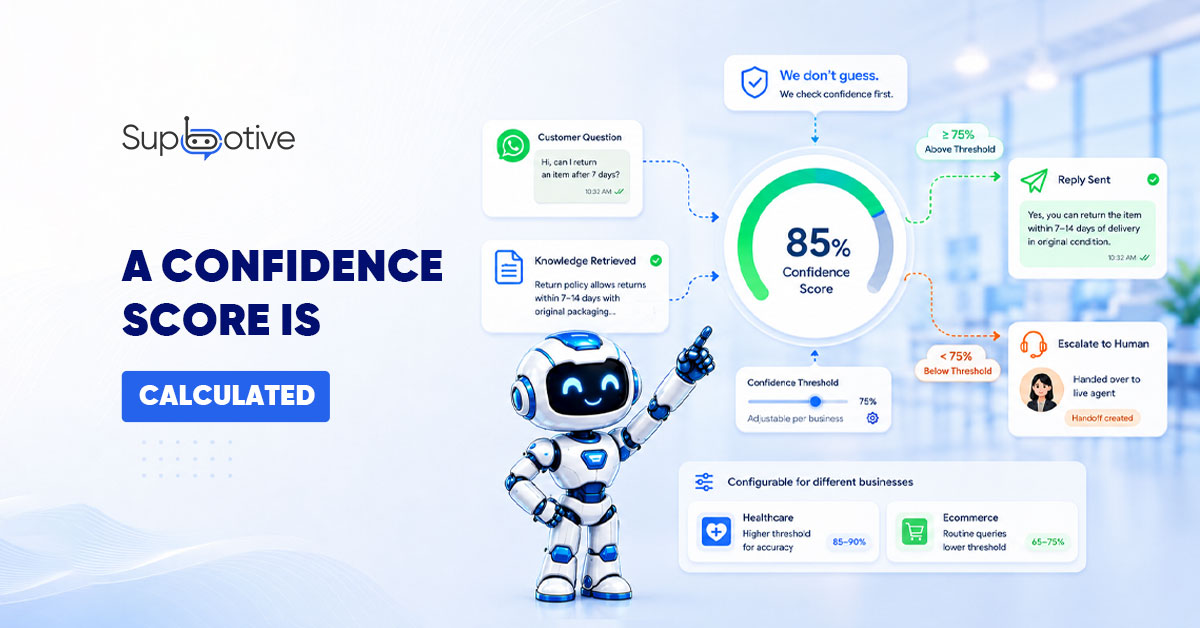
Before any reply is sent, Supbotive calculates a confidence score an internal measure of how well the retrieved knowledge base content matches the customer’s query. If the score is above the threshold: the answer is sent.
If the score falls below the threshold: escalation fires. The system does not guess. It does not send a vague response hoping the customer accepts it. It stops and passes the conversation to a human agent.
This threshold is configurable per deployment. A healthcare business might set it higher requiring stronger confidence before the bot answers independently than an ecommerce business handling routine shipping policy queries.
The principle is the same: a wrong answer delivered confidently is significantly worse than a transparent escalation.
Step 5: The Reply Is Delivered or Escalation Fires
5.1: When confidence is sufficient:
Average response time from message receipt to reply delivery is 2.1 seconds. The reply appears in the same WhatsApp conversation, no app switching, no portal redirect, no separate interface. The customer sees an instant response in the chat they already had open.
5.2: When confidence is below threshold or sentiment signals frustration:
A frustrated customer does not need a faster automated answer. They need a human. When escalation triggers, an alert fires the agent in queue. The average handoff time is under 30 seconds.
What the agent receives is not just a notification, it is the complete conversation history, every message sent and replied, the intent that was identified, and a flag showing why escalation was triggered.
The agent picks up in the same WhatsApp thread. The customer does not repeat themselves. The agent does not start from zero.
Step 6: The Conversation Is tracked and Logged
Every conversation resolved automatically or escalated is logged in the Supbotive Alerts section. Your team sees which queries were handled automatically, which triggered escalation and why, and which questions the bot could not answer at all.
This is not passive data. It is the intelligence that makes the system measurably better over time.
Step 7: The Knowledge Base Gets Smarter
Every message Supbotive cannot answer is flagged automatically in the Failed Responses. Your team reviews the flagged queries typically 30 minutes per week and adds the correct answers to the knowledge base.
The next time the same question arrives, Supbotive handles it automatically. The confidence score for that query type is now above the threshold. It never reaches your agent queue again.
Each cycle raises the automated resolution rate. Teams running this review process weekly consistently achieve 70% automated resolution within 60 – 90 days of launch. The system does not plateau at launch performance, it compounds in accuracy with every gap that is closed.
The 7 Step Workflow – At a Glance
|
Step |
What Happens |
Time |
|
1 |
Customer sends message, webhook fires |
Instant |
|
2 |
JSON payload parsed context retrieved |
Milliseconds |
|
3 |
NLP identifies intent |
Milliseconds |
|
4 |
Confidence score calculated |
Milliseconds |
|
5 |
Reply delivered or escalation fires |
1.1 sec average / under 30 sec to agent |
|
6 |
Conversation logged and tracked |
Continuous |
|
7 |
Knowledge base updated, resolution rate climbs |
Weekly cycle |
Why Understanding the Workflow Matters
Most business owners know chatbots exist. Fewer understand what actually happens inside one and that gap is expensive. When you understand the workflow, everything changes. You know why your knowledge base quality determines your chatbot’s accuracy.
You know why escalation triggers need to be configured before launching. You know why reviewing flagged conversations weekly makes the system measurably better over time.
This is not a generic explanation of how chatbots work. It is the specific, accurate journey of a WhatsApp message inside Supbotive from the moment a customer presses send to the moment they receive a reply.
FAQs
What happens when a customer sends a WhatsApp message to a Supbotive powered business?
The message arrives via the WhatsApp Business API webhook as a JSON payload. Supbotive parses the message, identifies intent, searches the knowledge base using RAG, calculates a confidence score, and delivers a reply in 1.1 seconds on average. If confidence is insufficient or sentiment detects frustration, it escalates to a human agent with the full conversation history in under 30 seconds.
How does Supbotive know what a customer is asking on WhatsApp?
Supbotive uses natural language processing to identify intent not just keywords. This means varied phrasing of the same query all maps to the same knowledge base answer. "Can I return this?", "How do I get a refund?" and "What’s your returns policy?" all trigger the same response.
What is RAG and why does Supbotive use it?
RAG stands for Retrieval Augmented Generation. Instead of generating answers from general knowledge, the AI retrieves relevant passages from your specific documentation and constructs a reply grounded in your actual policies. This prevents hallucination and ensures accuracy. It also keeps Supbotive compliant with Meta’s 2026 requirement for task specific WhatsApp bots.
What happens when Supbotive cannot answer a WhatsApp message?
When the confidence score falls below the configured threshold, Supbotive escalates to a human agent in under 30 seconds. The agent receives the complete conversation history, the customer’s original query, and a flag explaining why escalation was triggered. The customer never repeats themselves the agent picks up exactly where the bot left off.
Want to see this workflow running with your own FAQs and policies on WhatsApp? Book a live demo with Supbotive and we will walk you through every step.