
The Problem with Generic AI Chatbots
Most AI chatbots start with large language models trained on general internet content. That sounds impressive until a customer asks about your chatbot about your specific return policy, your shipping window, or whether a particular product is in stock.
A generic chatbot either makes something up or gives a vague no answer. Both outcomes damage customer trust.
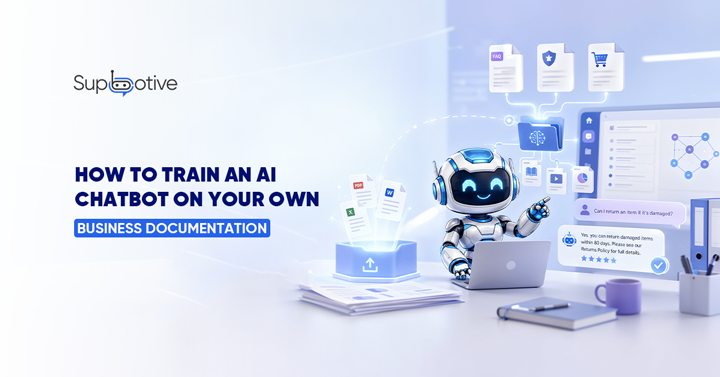
The solution is not a better AI model. It is training the chatbot on your actual business documentation your real FAQs, your real policies, your real product information. When the chatbot answers your content, the answers are accurate, specific, and consistent with what your team would say.
Support teams that succeed with AI focus on documentation first. The foundation does not prompt or plugin, it is a structured knowledge base built from your own materials.
What “Training” Actually Means for a Knowledge Based Chatbot
When people hear “training an AI,” they picture months of technical work. For most modern customer support chatbots, it is far simpler than that.
Modern AI knowledge bases use a technique called Retrieval Augmented Generation (RAG). Instead of inventing answers, the chatbot searches for your uploaded documentation for the most relevant content and generates a response grounded in that material. No guess. No hallucinating. Just your content, retrieved and presented accurately.
In practical terms, this means you upload your documentation, the system processes it, and the chatbot starts using it to answer customer questions. The better your documentation is structured, the more accurately the chatbot retrieves and uses it.
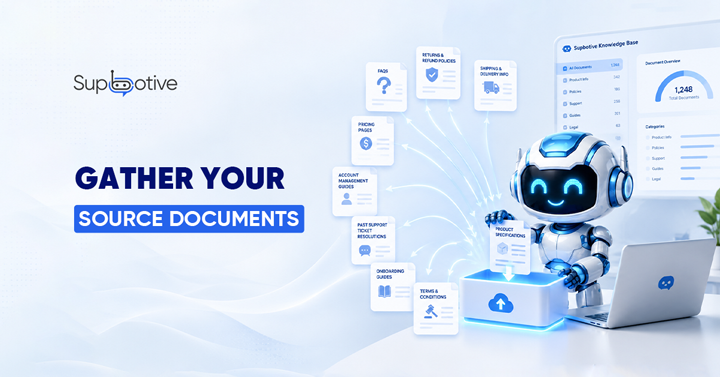
Step 1: Gather Your Source Documents
Priorities these first:
- FAQs: These are the single best training source because they already reflect real customer questions
- Return and refund policies
- Shipping and delivery information
- Product descriptions and specifications
- Pricing pages
- Account management guides
Also useful:
- Past support ticket resolutions these teach the chatbot how your team actually communicates
- Onboarding guides
- Terms and conditions (for policy-based queries)
Do not worry about having everything perfect before you start. A chatbot trained on your top 10 FAQs will immediately outperform a generic chatbot. You build from there.
Step 2: Structure Your Content for AI Retrieval
This is where most businesses go wrong. They upload a 3,000 word policy document and wonder why the chatbot gives vague answers.
AI does not read documents the way humans do. It scans for the most relevant passage that matches what the customer asked. If your answer is buried in paragraph 6 of a long article, the chatbot may retrieve the wrong section entirely.
Format content like this:
Instead of: “Our return policy covers a range of scenarios depending on the product type, purchase date, and condition of the item…”
Write it as: Q: How long do I have to return an item? A: You have 30 days from the delivery date to return any unused item in its original packaging.
Short Q&A pairs are retrieved more accurately than long unstructured text. One question, one clear answer, no filler. Use categories, tags, and clear headings so the AI can locate relevant information quickly.
Step 3: Upload and Test
Once your documentation is structured, upload it to your chatbot platform. Most modern platforms accept PDFs, Word documents, plain text, and web pages.
After uploading, test immediately and test specifically.
Ask the exact questions your customers ask most. Check whether the chatbot retrieves the right answer. Ask follow up questions. Try variations of the same query. See what happens when you ask something that is not in the documentation yet.
Support teams using a well trained knowledge base chatbot typically deflect 30 50% of common questions before they become tickets. For a team handling 1,000 tickets per month, even a 30% deflection rate saves roughly 50 hours of agent time monthly.
That result depends heavily on how well the initial training content is structured. The test phase is where you find the gaps before your customers do.
Step 4: Set Your Escalation Rules
Not every query should be answered by the chatbot. Before you go live, decide which types of questions should always go directly to a human agent.
Common escalation triggers include:
-
- Queries containing emotional language frustration, urgency, complaints
- Questions about specific live data the chatbot cannot access
- Topics that require human judgment disputes, damaged goods, sensitive issues
- Any query where a wrong answer could cause a serious problem
When the chatbot hits one of these triggers, it hands off to a human agent with the full conversation history. The customer does not repeat themselves. The agent has complete context from the start.
Step 5: Update Documentation Regularly
A chatbot trained on last month’s return policy gives last month’s answers. Outdated documentation is one of the most common causes of chatbot inaccuracy and one of the most avoidable.
When policies change, prices update, or new products launch the documentation needs to update with them. Any updates to your documentation are reflected in the chatbot’s responses, eliminating the lag between business changes and accurate customer answers.
Set a monthly documentation review as a standing task. It takes less time than fixing customer complaints caused by outdated answers.
What Documents Work Best and What to Avoid
Works well:
-
- Short, clearly written FAQs in Q&A format
- Policy documents with specific dates and numbers
- Product specs with clear attributes
- Step by step guides with numbered instructions
Works less well:
-
- Long legal documents without clear sections
- Internal jargon heavy content written for staff, not customers
- Duplicate content covering the same topic in multiple places
- Outdated documentation that has not been reviewed recently
The goal is documentation that a customer could read and understand immediately. If it is clear to a human, it will be retrieved accurately by the chatbot.
How Supbotive Handles Training
Supbotive is built around the documentation first training model.
You upload your FAQs, return policies, product information, and internal guides. Supbotive processes that content using RAG and immediately starts answering customer queries on WhatsApp and Telegram accurately, consistently, and around the clock.
When the knowledge base does not have an answer, Supbotive flags it automatically. Your team adds the correct answer once. The chatbot handles it next time.
No developer required. No technical setup. Just your existing documentation turned into a working customer support chatbot in under an hour.